Shopify Sales Tracker: How to Read 7-Day and 30-Day Momentum
Learn how to read 7-day and 30-day Shopify shop and product signals, check estimates and freshness, and turn momentum into a better research decision with Drilify.
Learn how to read 7-day and 30-day Shopify shop and product signals, check estimates and freshness, and turn momentum into a better research decision with Drilify.
A Shopify sales tracker is useful when it helps you decide what to investigate next, not when it tempts you to treat an estimate as a competitor's order ledger. In Drilify's Sales Tracking, you can track selected Shopify shops and products, compare recent 7-day and 30-day sales and revenue signals, inspect price history, and check how fresh the underlying observation is. Those signals help you shortlist products and stores for deeper research. They do not reveal a rival's private Shopify admin data.
If you run the store yourself, use Shopify's sales reports for your actual transactions. If you are studying another Shopify store, use Drilify's Sales Tracker to monitor the shops or products you choose and make a better research decision.
What a Shopify sales tracker can tell you
Drilify separates tracked shops from tracked products. Add a shop URL in the Shops tab or a product URL in the Products tab, or start tracking from the relevant library. The tracker then keeps your chosen subjects in one place. It is not a list of every Shopify store on the web, and tracker slots are separate from library browsing.
At shop level, review the available sales and revenue windows for today, yesterday, 7 days, and 30 days, plus the displayed growth rate, catalog size, rating, region, and last-updated information. At product level, you can inspect its price and price history alongside the available sales and revenue windows, growth, shop context, rating, and category. The exact numbers visible depend on the source data available for that item. Some are marked as estimates; some windows may be unavailable.
The value is the combination. A seven-day spike can send you to a product page. A changed price can explain why revenue moved even if unit demand did not. A stale source can tell you to wait before making an inventory decision. Drilify brings these checks into the same research workflow instead of leaving you to collect disconnected screenshots.
LATEST POSTS
More from Drilify
Interviews, tips, guides, industry best practices, and news.
14 min read
11 Best Dropshipping Product Research Tools for 2026
Compare 11 dropshipping product research tools by workflow, current pricing, features, and limitations, including Drilify and useful free resources.
The 7-day figure sits inside the 30-day figure. Do not subtract one from the other and call the difference a growth rate. Do not divide the 7-day number by the 30-day number and call it a conversion rate. Both calculations answer the wrong question.
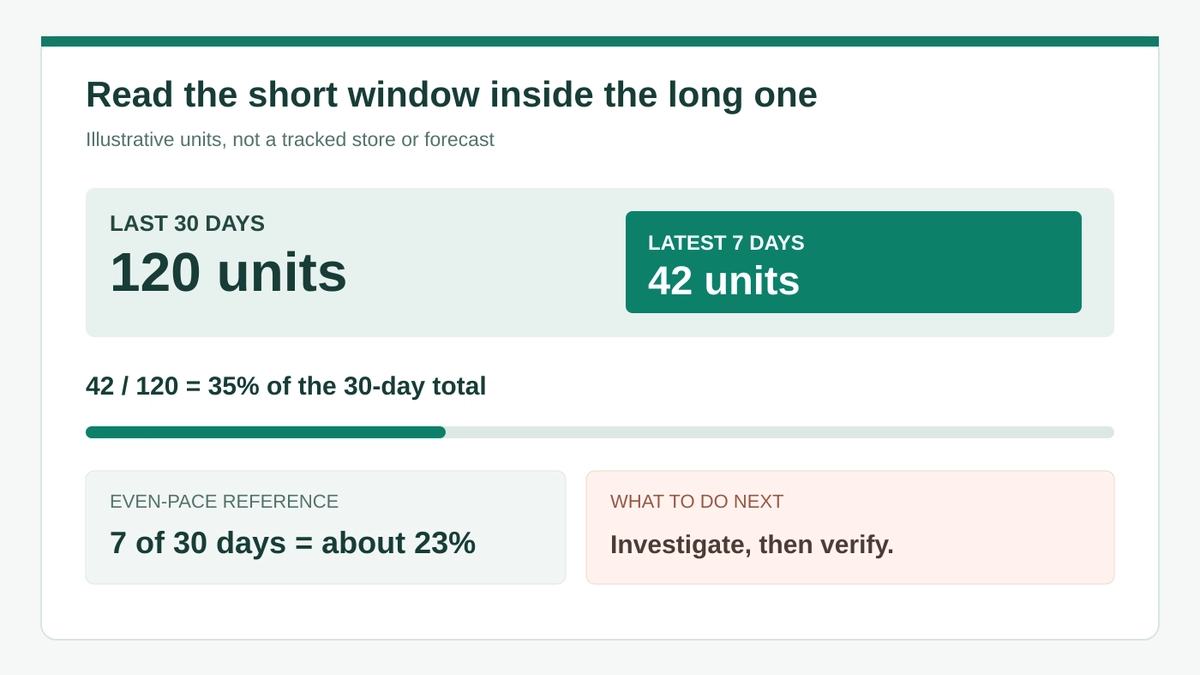
Instead, use the short window to ask whether recent activity is taking an unusually large share of the month. Suppose an illustrative tracked product shows 120 units over 30 days and 42 units over the latest 7. The latest week accounts for 35% of the 30-day total. At a perfectly even pace, seven days would account for about 23% of a 30-day window, or 28 of those 120 units. The larger recent share makes the product worth investigating. It does not prove that demand will continue or that the displayed counts are exact orders.
The same logic works for revenue, but read units and price together. If revenue rises while unit activity is flat, a price change or a different product mix may explain it. For a shop, a new catalog item or promotion can move the total without showing that every product is strengthening.
Illustrative example: a larger recent share is a cue to investigate, not proof of future growth.
Use the growth field shown in Drilify as a separate directional signal. It reflects the comparison available to that tracker; it is not calculated by comparing the overlapping 7-day and 30-day totals yourself. If the field is blank, do not invent a growth rate. Choose a different period, collect another observation, or move to a better-supported candidate.
Three questions before you call it momentum
Is the source recent? Check the last-updated time and source badge. A week-old observation is a weak basis for today's buying decision.
Is the number estimated? Read an Est. mark as an estimate, not a confirmed checkout count. Compare direction and relative movement, not a supposed exact revenue figure.
Did price change? Open price history before interpreting revenue. More dollars with the same units can be a price story rather than a demand story.
A missing daily value is not the same as zero sales. Drilify can show a dash where a day-level number is not observable. Treat that as missing information, not evidence that a store stopped selling.
Track a Shopify shop or product in Drilify
Start with one research question. For example: Is a shop gaining traction across its catalog, or is one specific product carrying the movement? That decides whether to track a shop URL, a product URL, or both.
Choose the right subject. Add a Shopify shop URL to Shops for a store-level view, or a product URL to Products for a specific item. You can also start from Drilify's Shop Library or Product Library when you find a candidate there.
Establish a baseline. Record the available 30-day and 7-day sales and revenue windows, the growth field, and the last-updated time. Note which figures are estimates. Keep the original page URL with your research notes.
Inspect the product context. For a promising shop, inspect its catalog and individual products instead of assuming store-wide growth applies to every SKU. For a product, compare its price history, rating, category, and shop context.
Check independent demand clues. Look at the offer, customer reviews, relevant ad activity, and whether the supplier can actually deliver to your target market. Drilify's research tools can help you move from a tracked signal to product and ad investigation, but no single signal validates a launch.
Run your economics. Enter your real selling price, product cost, shipping, fees, and planned ad spend into a profitability calculation. A product can have visible momentum and still leave you no usable margin.
Keep the shortlist small enough to review. Five candidates with current observations and supplier evidence are more actionable than fifty saved URLs with no next decision.
Turn the signals into a decision
The best use of tracking is to decide what to do next. A recent concentration of activity with stable price may justify a deeper product check. A stale observation or an unverified estimate may justify monitoring, not ordering. A rising revenue figure with no matching unit movement calls for a price and mix review. A candidate that looks strong but fails the margin test should be rejected or repriced.
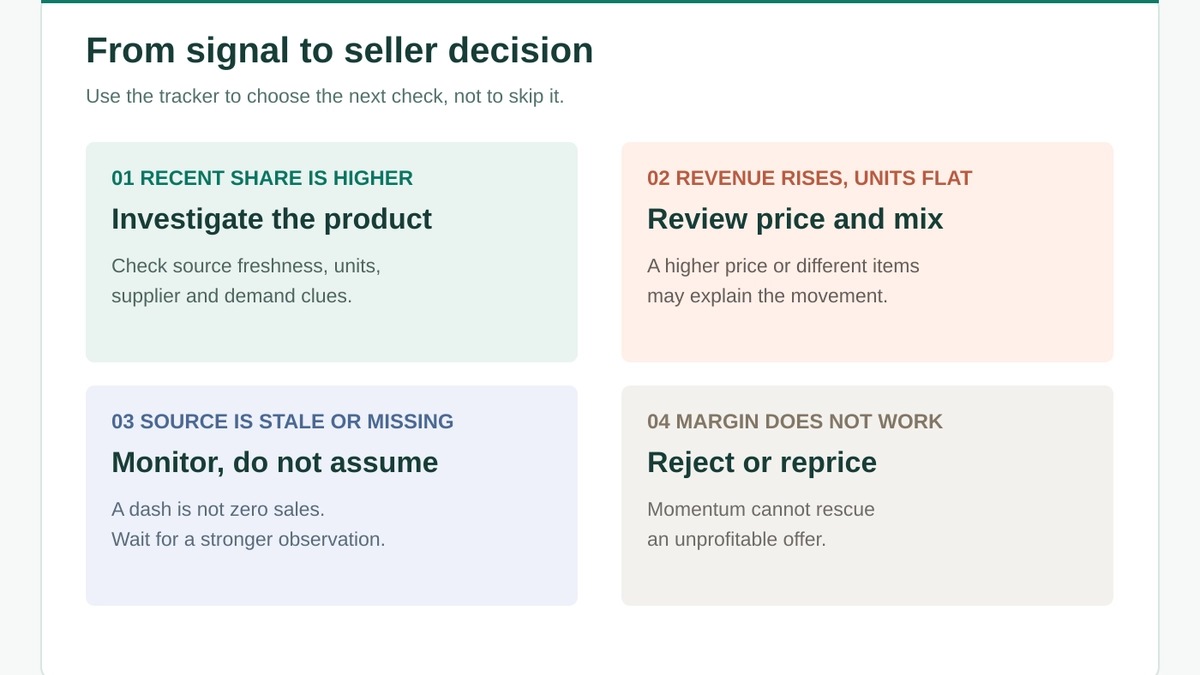
Match each tracking signal to a specific seller decision.
The visual is a decision guide, not a scoring system. In text: when recent activity takes a larger share of the 30-day window and the source is current, investigate the product and supplier. When revenue rises but units do not, inspect price changes and catalog mix. When the source is stale or a value is missing, wait for a better observation. When the economics fail, do not buy inventory or launch an ad test just because the tracker looks active.
Shop-level movement is not product-level proof
A store can grow because of one new item, a promotion, or changes across its catalog. To choose a product, move from the shop view into the product view and look for evidence specific to that SKU. Drilify's separation of Shops and Products makes that shift straightforward. Use the Shop Library to understand the seller and the Product Library to compare candidates, then track the ones that merit ongoing attention.
Revenue is not profit
Tracked revenue is a top-line signal. It does not tell you the seller's cost of goods, shipping expense, refunds, payment fees, or ad spend. Your own unit economics must carry the final decision. Set a target margin before the launch test, and work backward to the maximum you can pay for acquisition.
A practical weekly review routine
Once a week, review the same tracked shortlist. First scan the source freshness and estimate labels. Next compare the seven-day share against the 30-day context and look at the displayed growth field. Then open price history for anything with a revenue change. Finally, record one action for each candidate: research, monitor, test, or reject.
Do not move a candidate into testing until you can answer three questions: Who is the customer, can a supplier deliver a credible offer, and does your margin survive a realistic acquisition cost? Drilify helps you connect the shop and product signals to that decision. It cannot make the commercial judgment for you.
Frequently asked questions
Can a Shopify sales tracker show a competitor's exact sales?
Not from the competitor's private Shopify admin account. Drilify shows the available observed and estimated shop or product signals, with source and freshness indicators. Treat them as research inputs.
What is the difference between the 7-day and 30-day figures?
They are rolling windows of different lengths. The latest seven days are part of the latest thirty. The short window highlights recent activity; the long window gives context. Comparing their share can help flag a change, but it is not itself a growth percentage.
Why is a sales or revenue value marked Est.?
The label means the figure is an estimate rather than an exact transaction count. Use it to compare candidates and decide what deserves further checking. Do not present it as a store owner's verified sales report.
Why does a day-level field show a dash?
That value may not be observable for the selected item and period. A dash is not proof of zero sales. Check the source details and later observations before drawing a conclusion. fresh and more data is mostly available using the sync process, once the sync is complete a better version of the data is being fetched at run time based on users request.
Should I track a whole shop or an individual product?
Track a shop when your question is about the seller's overall momentum or catalog. Track a product when you need evidence about one item, including its price history and sales windows. Track both when you need to separate a store trend from a single-product trend.
Is a rising 7-day figure enough to launch a product?
No. It is a reason to investigate. Check source freshness, estimates, price movement, customer demand, supplier reliability, delivery, returns, and your actual margin before you test an offer.
Make your next product decision with more context
Use Drilify to track the Shopify shops and products you care about, then bring the 7-day and 30-day signals together with price history, product research, and your own profitability check. The result is a shorter, better-qualified list of products to test, not a guess dressed up as certainty.