Create a clear Shopify shipping policy with Drilify ShipGuard, then align processing, domestic delivery, international shipping, tracking, and checkout promises.
Create a clear Shopify shipping policy with Drilify ShipGuard, then align processing, domestic delivery, international shipping, tracking, and checkout promises.
A shipping policy answers the questions shoppers ask before buying: When will the order leave the warehouse? How long will delivery take? What will shipping cost? Can the parcel be tracked? What happens when it crosses a border or is delayed?
For a Shopify store, those answers should not be scattered across product pages, checkout messages, and support emails. A clear shipping policy puts the rules in one place and gives customers a realistic picture of fulfillment before they place an order.
Drilify's free ShipGuard tool creates a store-specific starting draft from the details that shape delivery expectations. You enter your store name, country, processing time, domestic shipping terms, and international shipping terms. ShipGuard then prepares a professional policy covering those inputs, tracking, and related shipping information, with a PDF download for review and recordkeeping.
This guide explains what a Shopify shipping policy should contain, how to create one with Drilify, how to add it to Shopify, and how Drilify compares with PiPiADS' form-driven shipping policy template. A generator saves drafting time, but you remain responsible for checking every promise against your real fulfillment operation.
What is a Shopify shipping policy?
A shipping policy explains how a store processes, dispatches, ships, tracks, and delivers orders. It should cover the time before a carrier receives a parcel as well as the expected transit time after dispatch.
That distinction matters. A store might need two business days to prepare an order and another three to five business days for domestic delivery. Saying only "delivery takes three to five days" can make customers believe the full order will arrive within that period.
Shopify lets merchants add a shipping policy under Settings > Policies. Once saved, policy links can appear in checkout, and you can add the page to store menus. The direct storefront path is normally /policies/shipping-policy. Compatible themes may surface the link on product pages too.
LATEST POSTS
More from Drilify
Interviews, tips, guides, industry best practices, and news.
14 min read
11 Best Dropshipping Product Research Tools for 2026
Compare 11 dropshipping product research tools by workflow, current pricing, features, and limitations, including Drilify and useful free resources.
Shopify's guidance is clear about responsibility: automated policy text is informational, not legal advice or a compliance guarantee. The merchant must keep the policy accurate and follow the promises it makes.
Why your store needs a clear shipping policy
It sets expectations before checkout
Customers can decide whether the delivery window, cost, and destination coverage work for them before paying. This reduces surprises after the order is placed.
It separates processing from transit
Processing time belongs to the store. Transit time usually belongs to a carrier. Explaining both gives customers a more honest estimate and helps support teams identify where a delay occurred.
It makes international costs visible
International orders may involve longer delivery windows, customs checks, duties, taxes, or carrier charges. The policy should explain what the store covers and what the customer may need to pay.
It gives support a consistent answer
When a customer asks where an order is, the support team can refer to the same processing, tracking, and delivery rules shown on the storefront.
It helps the store make promises it can keep
Writing the policy forces you to define the actual fulfillment workflow. If the warehouse cannot dispatch in one day, the policy should not promise same-day shipping. Shopify specifically advises merchants not to promise shipping or delivery times they cannot meet.
What a good ecommerce shipping policy should include
Order processing time
State how long the team usually needs to verify, pack, and hand an order to the carrier. Explain whether weekends and public holidays count. Identify longer lead times for custom, personalized, pre-order, or made-to-order products.
Domestic destinations and delivery estimates
List the domestic regions you serve, available shipping methods, estimated transit times, and how charges are calculated. If free shipping depends on an order threshold, make the threshold and exclusions clear.
International shipping
Identify the countries or regions you serve, typical delivery ranges, and restrictions. Clarify how duties, import taxes, customs delays, and local carrier fees are handled.
Shipping costs
Explain whether rates are free, flat, weight-based, price-based, location-based, or calculated by the carrier at checkout. Avoid publishing a rate that does not match checkout.
Tracking and notifications
Tell customers when tracking becomes available, where to find it, and what to do if the link does not update immediately.
Address changes and delivery problems
Describe how quickly a customer must report an incorrect address. Explain the process for parcels marked delivered but not received, damaged shipments, lost packages, failed delivery attempts, and returned-to-sender orders.
Delays, support, and updates
Set realistic expectations for peak seasons, weather, customs, carrier disruption, and remote locations. Give customers a monitored support channel and add a last-updated date.
How Drilify's free ShipGuard works
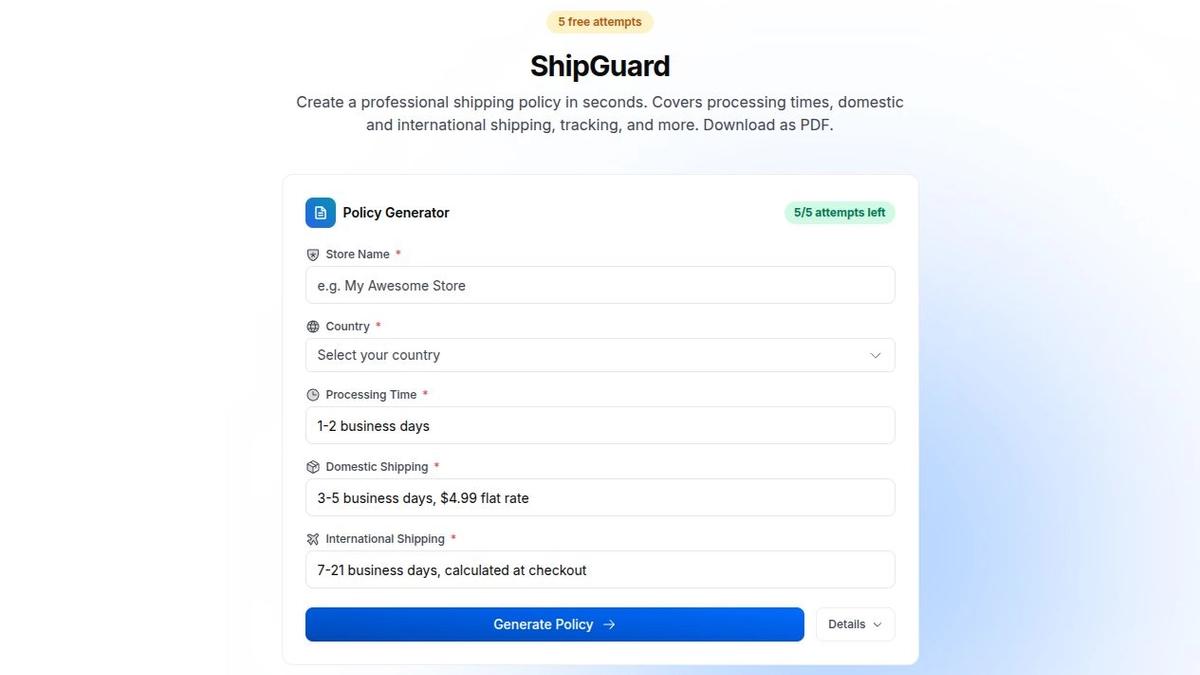
Open the Drilify free tools page and find ShipGuard. The live tool currently shows five free attempts and asks for five required inputs:
Store Name: The customer-facing name used in the policy.
Country: The store's operating country and geographic context.
Processing Time: How long the store needs before dispatch.
Domestic Shipping: The domestic delivery window and charge structure.
International Shipping: The international delivery window and pricing approach.
ShipGuard turns the store's real processing, domestic, and international shipping details into a policy starting point.
ShipGuard uses those details to create a professional shipping-policy draft. The tool description says the result covers processing times, domestic and international shipping, tracking, and related shipping information. It can also be downloaded as a PDF.
Those fields are useful because they force the draft to begin with the store's real delivery model. The output is still a starting point. Review it against your carriers, checkout settings, supplier arrangements, product restrictions, and destination rules before publishing.
Step-by-step: create a Shopify shipping policy with Drilify
Step 1: Map the real fulfillment journey
Follow one typical order from payment to delivery. Record when payment is verified, how long picking and packing take, when the carrier collects parcels, and when tracking becomes available.
If products use different warehouses or suppliers, note the slowest realistic processing window. A policy based only on the fastest supplier will create avoidable complaints.
Step 2: Confirm shipping zones and rates
Review the zones and rates configured in Shopify. Write down countries served, free-shipping thresholds, flat rates, carrier-calculated rates, and excluded destinations.
The policy and checkout must agree. If checkout calculates a location-based charge, the policy should not promise a universal flat rate.
Step 3: Open ShipGuard
Go to Drilify's free tools page and scroll to ShipGuard. Check the available-attempt counter. Prepare the wording for each field so you do not spend an attempt correcting a preventable typo.
Step 4: Enter the store name and country
Use the same name customers see in the header, checkout, order confirmation, and support messages. Select the country that best reflects the store's operation.
Step 5: Define processing time
Enter a range your operation can meet during normal demand. Specify business days if weekends and holidays are excluded. Plan to add exceptions for personalized products, pre-orders, large freight items, or products sourced after purchase.
Step 6: Add domestic and international terms
For domestic shipping, include the expected delivery range and pricing method. For international shipping, include a realistic wider range and explain whether charges are calculated at checkout.
After generation, add destination restrictions and customs responsibility where relevant. Do not imply that the store controls customs clearance or every carrier delay.
Step 7: Generate and review the draft
Select Generate Policy. Confirm that processing time, domestic shipping, international shipping, and tracking language match the operation.
Look for statements about weekends, holidays, duties, address errors, delivery estimates, missing parcels, and support. Add anything ShipGuard could not infer from the five inputs.
Step 8: Test realistic scenarios
Ask how the policy handles a Friday-night order, a customs delay, a supplier that needs four days to dispatch, a wrong apartment number, a parcel marked delivered but not found, and a holiday sales surge.
If the policy does not tell the customer what to expect, improve it before publication.
Step 9: Add the policy to Shopify
In Shopify admin, go to Settings > Policies, add or edit the shipping policy, review the formatting, and save. Add the page to a footer or customer-service menu. Open it on desktop and mobile to check links, headings, contact details, and readability.
Step 10: Maintain the policy
Review it when you change carriers, suppliers, warehouses, rates, free-shipping thresholds, processing times, destinations, or tracking systems. Add a last-updated date and keep a copy of the previous version.
Drilify ShipGuard vs PiPiADS Shipping Policy Generator
Both tools help merchants move beyond an empty policy page, but their input models differ.
Starting approach: PiPiADS fills a conventional shipping-policy template from a structured form. Drilify ShipGuard uses fulfillment details to create an AI-generated policy draft.
Core inputs: PiPiADS asks for store website, return-request days, same-day dispatch, out-of-stock handling, duties and taxes, and contact email. ShipGuard asks for store name, country, processing time, domestic shipping, and international shipping.
Fulfillment emphasis: PiPiADS includes fixed choices for specific situations. ShipGuard leads with the delivery timeline and domestic-versus-international operation.
Output: PiPiADS displays a generated template that can be copied and says it can be downloaded as a document or PDF. ShipGuard creates a professional policy and provides a PDF download.
Best fit: PiPiADS suits merchants who want to populate a familiar fixed template. ShipGuard suits merchants who want a shorter, fulfillment-focused input flow shaped around actual shipping windows and rates.
Review responsibility: Neither tool replaces operational or legal review. The merchant must correct anything that does not match the store.
PiPiADS' generated template includes standard sections for shipping, incorrect addresses, undeliverable orders, lost or stolen packages, returns, out-of-stock handling, duties and taxes, acceptance, and contact information. That breadth can be useful, but fixed wording still needs careful review.
ShipGuard's advantage is that it begins with the decisions customers care about most: how long the store takes to process the order, how domestic delivery works, and how international delivery differs. Those fields make the first draft easier to align with shipping settings.
Common shipping-policy mistakes
Combining processing and delivery time
Customers need both numbers. A three-day carrier service does not mean a parcel arrives three days after checkout if the store needs two days to dispatch it.
Promising the fastest possible delivery
Use a realistic range based on normal operations, not the best order you have ever shipped. Add exceptions for peak periods and products with longer lead times.
Ignoring international duties and customs
State who pays duties and taxes and explain that customs can delay delivery. Do not promise an international arrival date the store cannot control.
Letting the policy disagree with checkout
Rates, destinations, free-shipping thresholds, and methods should match what customers see at checkout. Test the store from several locations.
Publishing generated text without review
A generator cannot know every supplier, carrier, product restriction, remote-area surcharge, or support process. Treat the output as a strong draft, not a finished promise.
Frequently asked questions
Does Shopify provide a shipping policy page?
Yes. Shopify lets merchants add or edit a shipping policy under Settings > Policies. Saved policies can be linked in checkout and added to store menus. The merchant remains responsible for accuracy.
What should a Shopify shipping policy include?
Include processing time, domestic and international destinations, delivery estimates, shipping methods and costs, tracking, duties and taxes, address changes, delays, lost or damaged parcels, contact information, and a last-updated date.
Is Drilify ShipGuard free?
The live ShipGuard page currently shows five free attempts. Limits and availability can change, so check the counter before generating a policy.
What information does ShipGuard need?
ShipGuard asks for the store name, country, processing time, domestic shipping details, and international shipping details.
Can I download the ShipGuard policy?
Yes. The live tool description says the generated shipping policy can be downloaded as a PDF.
Where should I put the shipping policy in Shopify?
Add it under Settings > Policies, then link it from the footer or a customer-service menu. The direct storefront path is normally /policies/shipping-policy.
Does a generated shipping policy replace legal advice?
No. A generator provides a starting draft. The store owner must ensure that the policy is accurate, lawful, and consistent with checkout settings and real fulfillment practices.
Create your shipping policy now
A useful shipping policy turns fulfillment operations into clear customer expectations. Drilify ShipGuard gives you a faster first draft by starting with processing time, domestic delivery, and international delivery instead of a blank document.
Try the free Shipping Policy Generator now, then review every delivery promise before adding it to your Shopify store.