How to Spy on Competitor Ads: Meta & TikTok Ad Spy Guide
Research competitor Meta and TikTok ads in Drilify, compare creative and advertiser signals, check the offer and economics, and build an original test.
Research competitor Meta and TikTok ads in Drilify, compare creative and advertiser signals, check the offer and economics, and build an original test.
To research competitor ads, identify the advertiser, compare its public Meta and TikTok creatives, and study the hook, offer, landing page, and activity dates. For a seller who needs to turn those observations into a product decision, Drilify is our recommended starting point: its Ad Spy and Advertiser Library connect ad research to product, sourcing, and profitability checks.
The useful outcome is a brief you can act on: the customer problem, the strongest creative angle, the offer behind it, and the cost limits your own product test must meet. This guide takes you from competitor discovery through an original creative test, with Drilify keeping the research connected along the way.
What should an ad spy tool help you decide?
Competitor ad research starts with the same job across platforms: find relevant advertisers and study how they present products to potential buyers. Drilify supports that work through Meta and TikTok views in Ad Spy and platform filters in Advertiser Library. Drilify then gives you a path into product research, store context, sourcing economics, profitability calculations, and listing preparation.
Look for three layers of information. The creative layer includes the image or video, copy, opening hook, demonstration, and call to action. The activity layer includes the advertiser, country, status, dates, duration, and available ad counts. The commercial layer concerns the destination offer, product demand, sourcing cost, delivery fit, and margin you could achieve with your own business.
The creative and activity layers help you decide what deserves a closer look; the commercial layer helps you decide what deserves a test. Ad duration and engagement are clues about the message, while your own conversion and margin results determine whether the offer works for you.
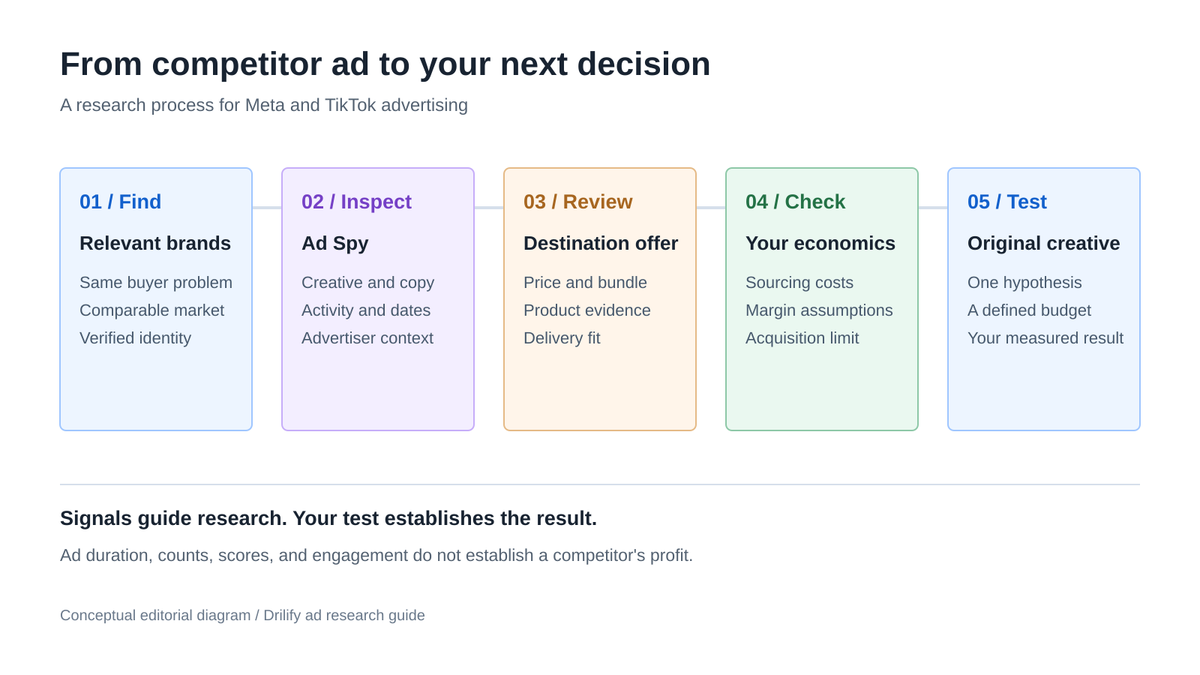
Follow the steps below to move from an ad you noticed to an offer and creative you can test.
LATEST POSTS
More from Drilify
Interviews, tips, guides, industry best practices, and news.
14 min read
11 Best Dropshipping Product Research Tools for 2026
Compare 11 dropshipping product research tools by workflow, current pricing, features, and limitations, including Drilify and useful free resources.
From competitor discovery to an original creative test.
1. Define the question and choose comparable competitors
Write one research question before opening an ad library. For a home-storage shop, it might be: which demonstration makes a small-space buyer understand the product quickly? For a skincare brand, it might concern the reassurance buyers need before trying a new routine. Keep the question tied to a product and a customer you can actually serve.
Select a small working group of competitors. Include direct sellers with similar products, brands addressing the same problem at a different price, and one advertiser with strong creative execution. Compare within your target market and a reasonably similar offer. A premium bundle with local delivery may support a strategy that a single imported item cannot.
Record each brand's website, Facebook page, TikTok profile where available, target country, product category, and advertised offer. Verify that the social account belongs to the business by following links from its storefront or checking consistent branding. A similar name alone is weak evidence.
Start with a manageable set, such as five advertisers and three relevant creatives from each. That is enough variety to spot repeated angles while keeping the review focused enough to turn into a brief.
Pro tip: Phrase your question as a decision: "Should my first test lead with the space-saving demonstration or the setup speed?" That makes every saved ad easier to evaluate.
2. Establish a baseline in the official ad libraries
Open the Meta Ad Library, choose the relevant country and ad category, and search the advertiser or a specific product term. Check the page identity, visible creative, delivery dates, and placements. Meta directs researchers to this library for currently running ads across its technologies. Its published field documentation also makes clear that additional spend and reach information depends on ad category and delivery region; ordinary commercial ads do not universally expose those details.
For TikTok, open Creative Center's Top Ads. Search a product or keyword, then narrow by region, industry, objective, and time frame where available. TikTok's dashboard guide describes those controls and says signed-out visitors see only five ads. Its Top Ads overview explains that featured creatives are advertiser-authorized. Treat this as a selected inspiration set, rather than a complete record of every TikTok campaign.
Use the official libraries to inspect a specific brand or creative, then move into Drilify to compare advertisers across platforms and carry the strongest ideas into product research.
3. Open Drilify Ad Spy and distinguish search from tracking
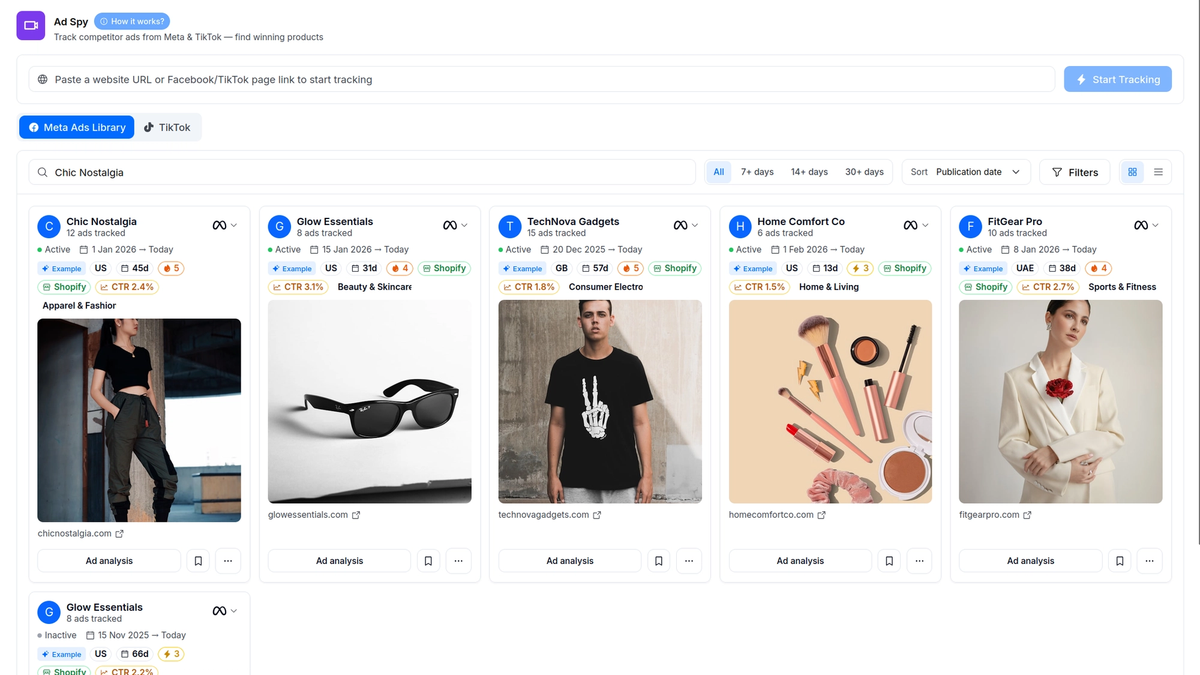
Sign in to Drilify and open Ad Spy from the dashboard sidebar. The page has separate Meta Ads Library and TikTok tabs. Its How it works? guide provides context for the page, and the controls below the tabs let you search and filter the available ad cards.
Use the search field to narrow ads already in the current view. The URL field has a different job: Start Tracking adds a brand by website or Facebook/TikTok page link. Search first when you are reviewing an existing advertiser; use tracking when you need to add a new one.
For existing research, begin with the search field and platform tab. Type the advertiser name, inspect the returned identities, and confirm the relevant domain or page. A website and a social page can use different names, so check both when necessary. Available data and fields can vary by source and advertiser.
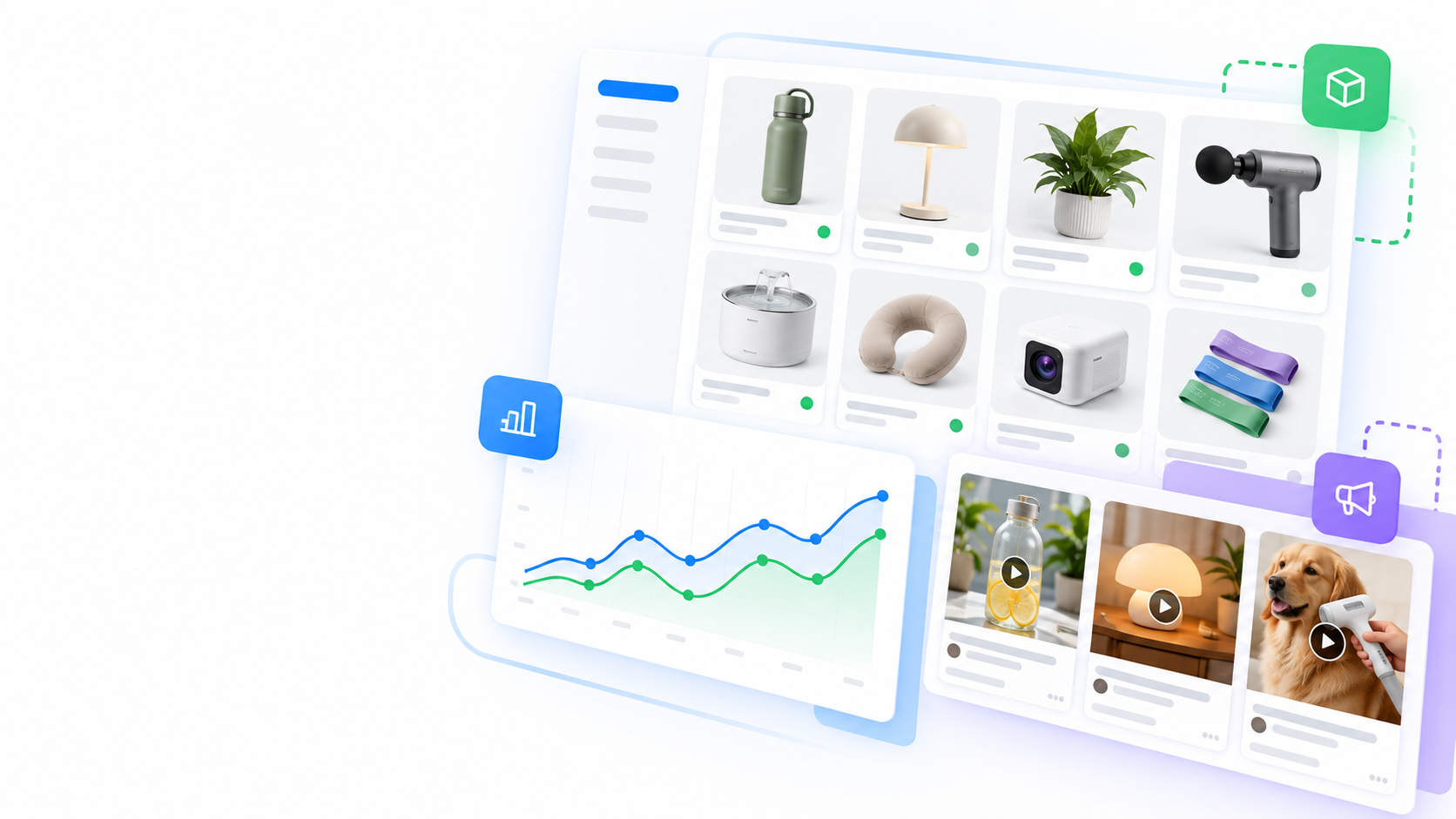
The Drilify Ad Spy view brings the platform tabs, search, duration filters, sorting, and creative cards together, so you can compare the ads most relevant to your question.
Explore Meta and TikTok ads with Drilify's search, filters, and creative cards.
4. Filter Meta ads in a sequence you can explain
Choose Meta Ads Library, search your advertiser or relevant product term, and open Filters. Start with the country and creative format that matter to your offer. Inspect the status options and use a relevant active view when researching current advertising. Keeping these choices consistent makes later comparisons more useful.
Review the broad result set before choosing a duration threshold. Drilify provides 7+ days, 14+ days, and 30+ days controls. These thresholds describe how long an ad has been active; they are not interchangeable with a date range for when you happened to observe it. Use a longer threshold to find sustained messages, then return to the broader view to see newer ideas.
Sort by publication date to spot recent creative changes. Where engagement details are available, use them to choose what to inspect next, then compare the actual hook, offer, and landing page.
Write down the filter combination alongside your findings. If you search one brand in the United States and another in a different market, their counts and offers are not directly comparable. If the screen returns little data, widen one filter at a time and recheck the advertiser identity.
Pro tip: Review sustained ads and recent ads as two separate sets. One reveals recurring messages; the other surfaces new angles to test.
5. Study TikTok ads as videos and brand signals
Switch to the TikTok tab in Drilify Ad Spy and search a brand or product phrase. Narrow the view by the market and filters relevant to your offer, then compare the creative cards, advertiser, activity duration, and destination where shown.
Watch a relevant creative in segments. First examine the opening: what is shown before the viewer has context? Next inspect the demonstration and the evidence supporting the promise. Finally note the offer and call to action. Record what a buyer must already know for the message to make sense.
For a storage product, a before-and-after scene can demonstrate the benefit faster than a list of dimensions. For clothing, a fit demonstration can answer a buyer's question that a static product shot leaves open. Use patterns like these to create an original opening for your own audience.
Use Drilify's TikTok Ad Spy and Advertiser Library together: the first shows the creative and offer, while the second puts that ad in the context of the advertiser's broader visible activity. Compare several angles before deciding which one to investigate further.
6. Use Advertiser Library to put individual ads in context
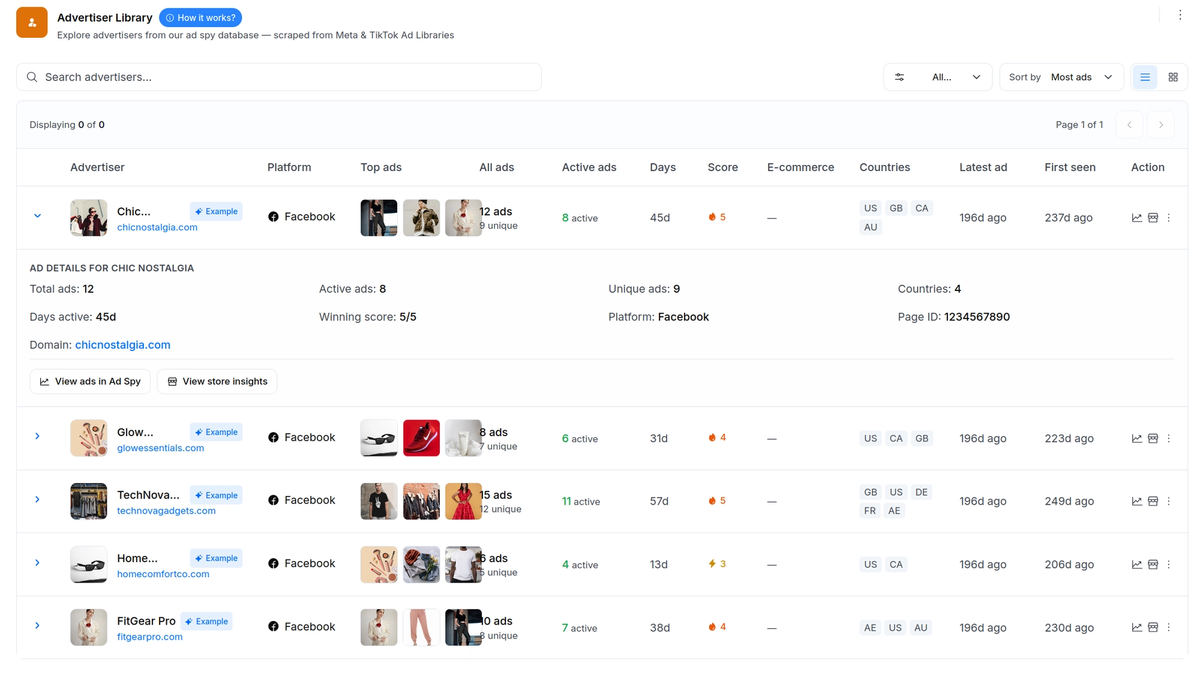
Open Advertiser Library from the dashboard sidebar and choose the relevant platform filter. Search the advertiser and inspect its row or card. This area organizes advertisers from Drilify's ad tracking, making it easier to compare a brand's visible activity with the individual creatives you reviewed.
The useful fields include top-ad previews, total and unique ad counts, active ads, days, score, countries, latest ad, and first seen. An e-commerce indicator may also be present. In the table view, scroll horizontally to inspect the columns that fall outside the first screen. Check what each date and count represents before using it in your notes.
Unique and total ad counts show whether a brand has several distinct creatives or variations of one idea. Active ads and duration highlight sustained messages; countries add market context; and first-seen and latest-ad dates help separate an older campaign from a newer angle.
Use View ads in Ad Spy to return to the creatives behind an advertiser summary. The Advertiser Library helps you move between the brand-level pattern and the individual ads that explain it.
Compare advertiser activity, creative counts, markets, and dates in Drilify.
7. Turn creative observations into a structured research note
For each shortlisted ad, capture the advertiser, source link, platform, country, observation date, displayed activity dates, and destination when available. Add the filter combination used to find it. These details make your research retrievable and reduce the risk of comparing unrelated markets or periods later.
Describe the hook in your own words: the question, problem, visual interruption, or promise that starts the ad. Describe the demonstration: how the product is used and what changes for the customer. Describe the proof: a visible process, a testimonial, a specification, or another supporting detail. Then describe the offer and requested next action.
Separate observations from interpretations in your notes. "The first shot shows a crowded drawer" is an observation. "The ad may be addressing buyers frustrated with clutter" is an interpretation. "This message will convert" is a prediction that needs testing. That distinction improves the quality of your creative brief.
Drilify's bookmark controls and Saved Collections give you a place to organize ads for later review. Group by customer problem or creative angle instead of collecting everything under one brand. A collection named "small-space demonstration" is more useful when writing a brief than a folder containing every video you liked. Keep your source notes alongside the saved creative references.
8. Follow the advertised offer through the landing page
When a destination is available, inspect the page the ad points to. Check that it belongs to the expected brand, then compare the ad's promise with the product description, price, bundle, delivery information, returns wording, and next action. The creative and the destination together explain the proposition a customer encounters.
Look for continuity. Does the product shown in the video match the page? Is the promoted bundle easy to find? Is the main benefit supported by the page's specifications and images? Does the price depend on selecting a variant or meeting a condition? Record the details that would matter to your own buyer.
Use the landing-page review to improve your own offer. Note how the page presents the main benefit, handles price or variants, supports the claim, and answers delivery or returns questions. Those details give your creative brief a stronger destination.
For more context on the business behind the offer, Drilify's Store Intelligence adds catalog, traffic-mix, technology, and available performance signals. Combine that store view with the ad and landing page to understand how the competitor positions the product.
9. Check product demand and economics before borrowing an angle
Take the most promising ad angles into Drilify's Product Libraries. Compare price, ratings, reviews, seller context, and available sales signals to see whether the product serves a clear need at a workable selling price.
If you decide to investigate sourcing, Drilify's CJ catalog provides supplier cost, estimated retail price and margin, competition, and shipping context. Compare those signals with your destination market and intended offer. Suggested retail and margin help you investigate pricing room; your final economics depend on the actual supplier terms and costs you incur.
Then model your own order. Include product cost, delivery, payment and platform fees, expected returns, and acquisition cost. Drilify's Profitability Calculator supports margin and break-even checks using the assumptions you enter. The free tools page is a relevant starting point for profitability work.
For example, at a $40 selling price with $24 in non-ad variable costs, $16 remains before acquisition. If your target contribution is $6 per order, the maximum acquisition cost is $10. That makes a revenue-based ROAS target of 4. Enter your own costs in Drilify's calculator and adjust the threshold as your real results come in.
That is Drilify's advantage in this workflow: competitor ads become a starting point for product, sourcing, and margin decisions, not just a folder of creative examples.
Pro tip: Write the economic threshold before producing several creatives. An angle worth filming should support an offer you can fulfill at a workable price.
10. Build an original creative brief and a limited test
Choose one buyer problem from the research and write a single testable hypothesis. For instance: "Showing the drawer before and after setup will explain the space-saving benefit more clearly than opening with the product alone." Keep the product, audience, landing page, and offer consistent when comparing the two openings.
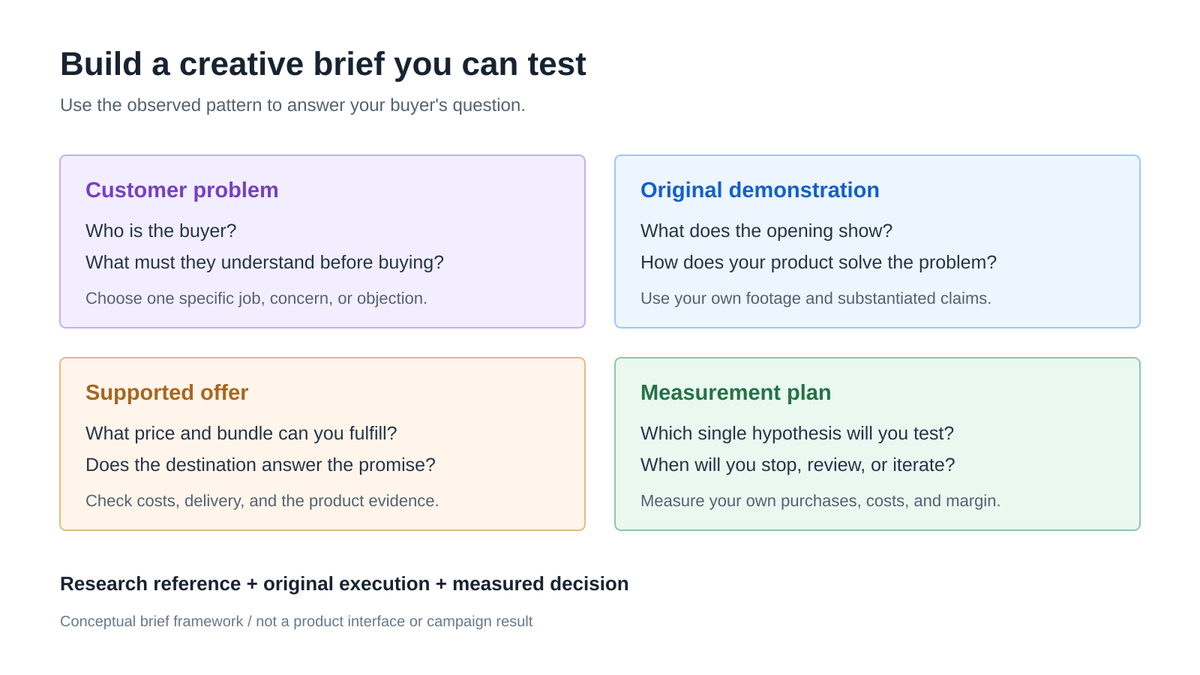
Your brief should specify the customer, opening scene, demonstration, support for the claim, offer, call to action, and destination. Include references to the patterns you studied, then use your own footage, wording, and substantiated product claims. Reproducing a competitor's video, testimonial, logo, or distinctive copy is not necessary to test the underlying idea.
Plan the measurement before the launch. Use your own ad account and store data for spend, clicks, landing-page behavior, purchases, acquisition cost, returns, and contribution margin. Define a budget limit, review point, and decision rule suitable for your business. Avoid choosing a universal spend amount based on an ad library's score or duration.
Drilify's Listing Engine can help prepare editable product copy and SEO fields for the offer you develop. Review the output against your actual product and supplier information before using it. This connects the research brief to a page that answers the buyer's questions.
Turn the customer problem, demonstration, offer, and measurement plan into a creative brief.
Keep the next research pass focused
After your first test, return to the same competitor group with a new question. Check whether the visible messages changed, whether a new creative appeared, and whether your own results support another iteration. Record the observation date and filters again. Consistent research is more useful than a large, undated collection of ads.
For the broader product shortlist behind your creative work, read the dropshipping product research tools guide. Start your next advertising review with one competitor, one customer problem, and one clear brief.
An ad spy tool helps you discover and organize publicly available advertising information. You can inspect creative, copy, advertiser identity, destinations when available, and activity signals. Drilify combines Meta and TikTok ad research with advertiser views and additional product, store, sourcing, and profitability tools, helping you move from creative inspiration to a more informed commerce decision.
How can I find a competitor's Facebook or Instagram ads?
Start with the Meta Ad Library, select the relevant country and category, and search the correct advertiser or product term. In Drilify, choose the Meta Ads Library tab, search the brand, and narrow the available cards with appropriate filters. Check the advertiser identity and displayed placements rather than assuming a similarly named page belongs to your competitor.
Where is TikTok brand or shop research in Drilify?
Use the TikTok tab in Ad Spy for creative research and the TikTok platform filter in Advertiser Library for advertiser context. Follow the creative and advertiser fields actually shown for the brand you investigate. Product and sales conclusions need supporting product evidence; an ad card or advertiser count alone does not establish units sold, revenue, or profit.
Does an ad running for 30 days mean it is profitable?
Yes, A longer run can make a message worth investigating, but duration alone does not reveal acquisition cost, conversion rate, returns, or contribution margin. Study the offer and the product, then test the hypothesis against your own advertising and store data. Treat scores, duration, and available engagement as research signals rather than guaranteed outcomes.
Can I research ads using free sources?
Yes. Meta Ad Library and TikTok Creative Center are useful public starting points for visible creative. Drilify adds a more connected path through ad cards, advertiser context, product research, and seller economics when you are ready to turn inspiration into a test.
What should I do when a search or metric is empty?
Confirm the brand identity, platform, country, and filter choices, then widen one filter at a time. Recheck the available source or activity dates. A blank metric is unavailable information, not zero performance, and an empty filtered view does not prove that a brand has no ads. Record the uncertainty and base the next decision on the evidence you can verify.